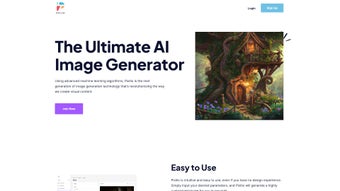

Download Pixilio – AI Image Generator, Free Trial, Secure Design Tool
Introduction
In today’s fast‑paced digital market, visual content is no longer a luxury—it’s a necessity. Brands, marketers, and solo creators constantly search for tools that can keep up with tight deadlines, limited budgets, and the ever‑growing demand for fresh imagery. Traditional graphic‑design suites like Photoshop or Illustrator demand both skill and time, while stock‑photo libraries often leave you with generic, overused pictures.
Enter Pixilio, an AI‑powered web application that promises to bridge the gap between high‑quality design and effortless creation. Built on a deep‑learning model trained on millions of reference images, Pixilio lets anyone—regardless of design experience—produce custom, brand‑aligned visuals in a matter of seconds. The platform’s promise isn’t just speed; it also guarantees full ownership of each generated asset, a secure cloud environment, and flexible pricing that scales from individual freelancers to large enterprises.
This review will explore how Pixilio works, the features that set it apart, the practical steps to get started, and whether it truly delivers on its bold claims. By the end, you’ll have a clear picture of whether Pixilio deserves a spot in your visual‑content toolkit.
Overview & Core Features
Pixilio is a cloud‑native graphics generator that leverages generative adversarial networks (GANs) to synthesize original images on demand. Users begin by entering a simple textual prompt, selecting a style, and optionally uploading brand assets such as color palettes or logo files. The AI then interprets these inputs, mixing learned visual patterns to create a set of unique images that match the specified criteria.
Because the service runs entirely in the browser, there’s no need for heavy local installations or powerful hardware—any device with a modern browser can tap into the same AI engine. The platform also embeds a robust licensing model: each output is automatically granted exclusive rights to the creator, eliminating the need for additional royalty payments or attribution. This makes Pixilio especially attractive for agencies that need to deliver commercial‑grade assets without worrying about copyright entanglements.
Key Functionalities
- AI‑Driven Image Synthesis: Generates brand‑specific visuals from scratch, ensuring each file is unique.
- Brand‑Style Controls: Upload color codes, typography references, and mood boards to keep every image on‑brand.
- Rapid Rendering: Typical generation time is under 10 seconds per image, accelerating content pipelines.
- Multi‑Format Export: PNG, JPEG, SVG, and WebP with resolution options up to 4K for print‑ready needs.
- Template Library: Pre‑designed layouts for social media, email headers, blog graphics, and ad banners.
- Version History & Asset Management: Every iteration is saved, allowing you to revert, edit, or reuse past creations.
- Full Ownership License: Users retain 100 % commercial rights; Pixilio claims no royalties.
- Collaboration Mode: Invite teammates, assign roles, and comment directly on projects.
- API & Webhooks: Seamless integration with Zapier, WordPress, and custom CI/CD pipelines.
- Regular Model Updates: Monthly improvements add new styles, better color fidelity, and enhanced text handling.
The combination of these features positions Pixilio as more than a novelty AI toy—it becomes a practical design assistant that can replace multiple traditional tools, from stock‑photo subscriptions to vector editors. The platform’s focus on security, ownership, and ease of use addresses many pain points that have historically held back AI‑generated content adoption in professional environments.
Installation & Usage Instructions
Because Pixilio is delivered as a SaaS solution, there is no conventional installation process. All you need is an internet connection and a modern browser. Follow these steps to start creating images:
- Create Your Account: Navigate to pixilio.com, click “Sign Up,” and register with an email address or via SSO (Google, Microsoft, Apple). Email verification completes in under a minute.
- Select a Plan: Choose the 7‑day free trial to explore core capabilities, or pick a subscription tier that aligns with your projected usage (individual, team, or enterprise). All plans are billed securely via SSL‑encrypted checkout.
- Configure Brand Settings: In the “Brand Hub,” upload your logo, define primary/secondary hex colors, and set preferred fonts. These parameters will automatically feed into every new project.
- Start a New Project: Click “New Project,” then fill out the prompt fields:
- Subject: The main focus (e.g., “modern coworking space”).
- Style: Choose from “flat design,” “photorealistic,” “hand‑drawn,” etc.
- Colors: Pick from your saved palette or enter custom hex codes.
- Mood & Tone: Keywords such as “energetic,” “minimalist,” or “vintage” guide the AI’s aesthetic decisions.
- Generate & Refine: Hit “Create.” Pixilio returns up to three variations instantly. Use the “Refine” sliders to adjust composition, contrast, lighting, or to add text overlays without leaving the browser.
- Download or Share: Once satisfied, click “Download” to save in your chosen format and resolution. You can also generate a shareable link or embed the image directly via API.
- Manage Your Library: All assets appear in “My Library,” where you can organize them into folders, tag for SEO, and revisit earlier versions.
Compatibility: As a web‑based service, Pixilio runs on Windows, macOS, Linux, ChromeOS, Android, and iOS browsers that support modern JavaScript (Chrome, Edge, Safari, Firefox). No additional downloads or plug‑ins are required.
For power users, an API key is available in the dashboard. This key unlocks programmatic image generation, allowing you to embed Pixilio’s capabilities into custom workflows, marketing automation platforms, or even internal design systems.
Pros, Cons, and Frequently Asked Questions
Pros
- Lightning‑fast image generation reduces design turnaround time.
- AI‑crafted visuals are truly unique, mitigating copyright concerns.
- User‑friendly interface requires no prior design training.
- Full commercial ownership of every asset.
- Cross‑platform web access works on desktop, tablet, and mobile.
- Collaboration tools streamline feedback loops for teams.
- Extensive template library jump‑starts common marketing assets.
- API and webhooks enable seamless workflow automation.
Cons
- Creative nuance is limited to the AI’s interpretation of prompts.
- Higher‑resolution (4K) exports require a premium subscription.
- Continuous internet connection is mandatory; offline work isn’t possible.
- Complex brand guidelines may need manual fine‑tuning after generation.
- Pricing can become steep for large enterprises needing massive image volumes.
Frequently Asked Questions
Can I use Pixilio images for commercial advertising?
Yes. All images generated through Pixilio are owned exclusively by the user, allowing unrestricted commercial use without additional licensing fees.
Is there a free version of Pixilio?
Pixilio offers a 7‑day free trial that grants full access to core features. After the trial, you can continue with a paid plan or, if available, downgrade to a limited free tier.
How does Pixilio ensure image uniqueness?
The AI creates each image from scratch using learned patterns rather than pulling from existing stock libraries, guaranteeing that every output is original and not duplicated elsewhere online.
What file formats can I export?
Pixilio supports PNG, JPEG, SVG, and WebP. You can also select resolutions up to 4K for high‑quality print or digital use.
Can I integrate Pixilio with my existing workflow?
Yes. Pixilio provides an API key and ready‑made webhooks for platforms such as Zapier, WordPress, and custom CI/CD pipelines, enabling automated image generation within your content‑creation process.
Conclusion & Call to Action
Pixilio arrives at a time when the demand for fresh, brand‑centric visuals outpaces the supply of skilled designers. By marrying cutting‑edge AI with an intuitive, cloud‑first interface, it empowers marketers, entrepreneurs, and creative teams to produce high‑quality graphics at a fraction of the traditional cost and time. While the reliance on an internet connection and the need for higher‑tier plans for ultra‑high‑resolution assets are valid considerations, the overall value proposition—unique images, full ownership rights, and seamless integration—makes Pixilio a compelling addition to any modern marketer’s toolbox. Ready to experience AI‑driven design without the learning curve? Start your free trial today and see how quickly you can turn ideas into polished visuals.



.png)



